

Get the App
GardenCart installs straight from your browser — free, no app store, no download required. Add it to your home screen and it opens full screen just like a native app, with your favorites and nearby stands ready to go.
- 1
Open GardenCart in Safari
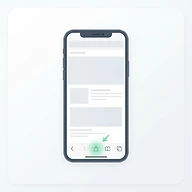
On your iPhone, open Safari and go to gardencart.base44.app. Installing only works in Safari — not Chrome or Firefox on iPhone.
- 2
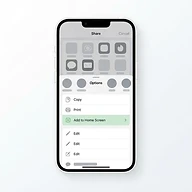
Tap Share, then “Add to Home Screen”
Tap the Share button (the square with the up arrow) in the bottom toolbar. Scroll the menu and choose “Add to Home Screen”.
- 3
Tap “Add” — you're done
Confirm the name and tap “Add”. A GardenCart icon appears on your home screen. Open it like any other app — no app store needed.

On a computer? You can install GardenCart basically the same way — look for the install icon in your browser's address bar, or an "Install" option in the browser menu. The exact wording varies by browser.